How to play Swudoku
A shared daily sudoku you play by swapping tiles. No timer. Your score is how few swaps you needed.
Swudoku is the daily 9×9 Swap Sudoku.
The board is already full. The numbers are in the wrong places. You swap until every row, column, and 3×3 block contains 1–9 once each.
The goal
Solve the board in as few swaps as possible.
Score is your swap count. Lower is better. The player who finishes in 6 swaps beats the player who finished in 14, whatever the clock said.
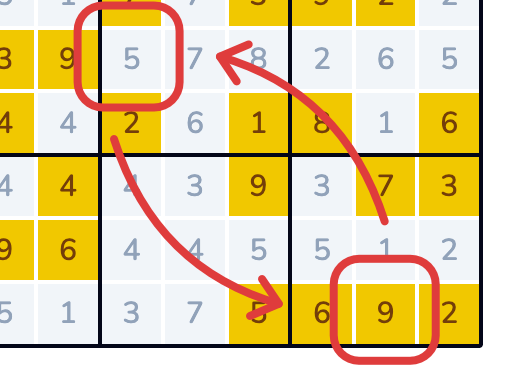
A Double Swap puts both tiles in the correct cell in one move. Those are the games that land in GOAT territory.
The colours
Blue: currently selected
You’ve tapped this tile. Tap any other tile to swap them.
Grey: needs to move
This tile is in the wrong cell. Grey tiles are the work.
Yellow: right cell, groups unfinished
The number is home, but its row, column, and 3×3 block are not complete yet. The tile itself does not need to move. Its neighbours still do.
Green: one group complete
The tile is in the correct cell and it belongs to a complete row or column or 3×3 block. Green tiles stay put.
Dark green: finished
The tile is in the correct cell and its row, column, and 3×3 block are all complete.
When every tile is dark green, you’re done.
Watch the colours after each swap. They tell you whether the move helped.
Step by step
1. Read the board first
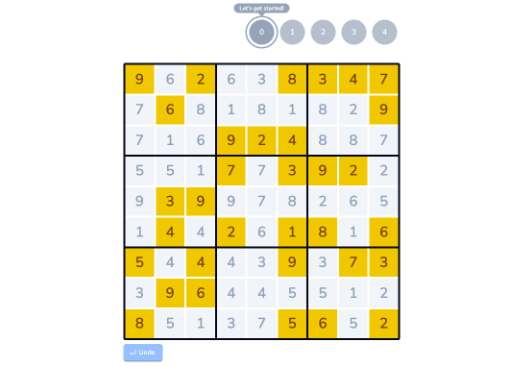
Spend half a minute before you tap. Look for a 9 in a row that already has a 9, or a number that clearly belongs next door. Low swap counts start here.
2. Select your first tile
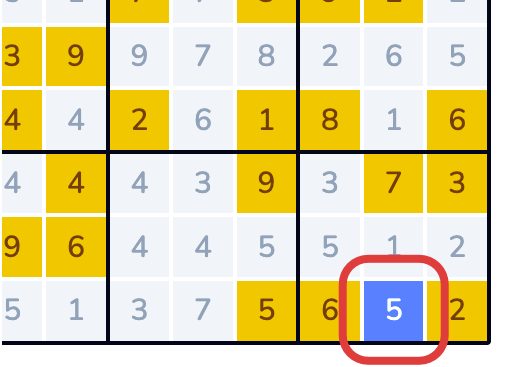
Tap any grey tile. It turns blue.
3. Select your second tile
Tap any other tile. They switch. Colours update.
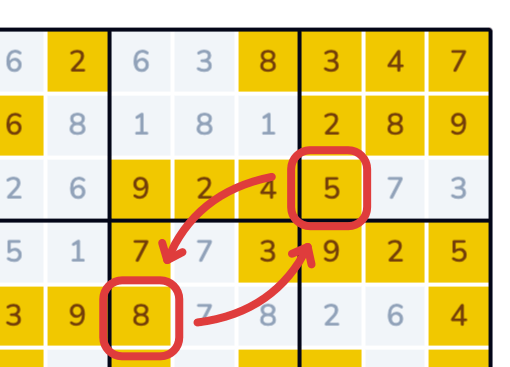
4. Look for Double Swaps
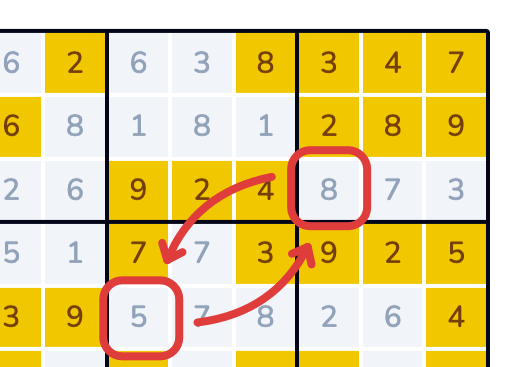
Scan two greys and ask whether they want each other’s cells. Two correct tiles in one move is the cheapest way to cut the score.
5. Work one area at a time
Pick a row, column, or 3×3 block. Untangle it before you hop across the grid. Fixing one area often shows the next swap.
6. Use Undo
A swap that made the colours worse can come straight back. Undo has no penalty.
7. Follow the green
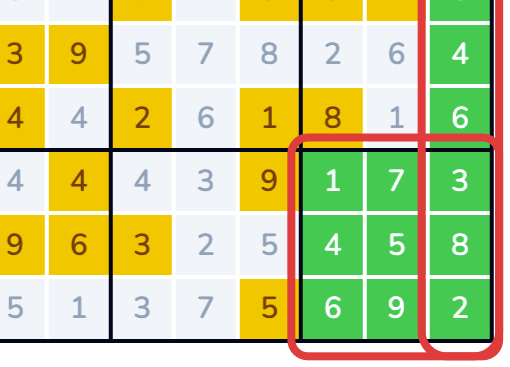
Yellow turns green when one group completes, then dark green when all three are done. The last handful of grey tiles is where sloppy boards bleed swaps.
First-game tips
Start with the obvious mismatches. Two of the same number in one row or column is an easy first fix.
Yellow means the tile is home. Its row, column, or block still needs work. Sort the neighbours.
Ask where both tiles go. A swap that only helps one cell often creates a new grey.
Slow down at the end. The last few greys are where you either keep a low score or donate extra moves.
Use the colours as a map. A row with no green still needs work. A row that is all green or dark green can be left alone.
Later: a lower score
Map before you swap. If tile A belongs at X, and tile B is sitting at X and belongs at Y, you can often chain those instead of solving them as two stories.
Look for cycles. Three or four tiles sometimes rotate through each other’s cells. See the cycle early and you spend the minimum moves.
Finish a block. Completing a 3×3 turns those tiles green (or dark green, if their rows and columns are already done). The rest of the board gets quieter.
Use the sudoku you already know. Naked singles and hidden pairs still name a cell before you touch it.
A longer tactics sheet: strategy guide for new players.
After you finish: How you compare
The results screen shows your swap count, Double Swaps, best double-swap streak, and mistake swaps. You can share that score.
If you’re signed in, you may also see How you compare: a histogram of how many players finished this puzzle with each swap count.
- Across the bottom: swap count, from a finish made of Double Swaps through to one swap per tile that started in the wrong place
- Up the bars: how many players landed on that score
- Your result is highlighted, with your swap count and how many players have finished
The graph appears when more than one player has finished and your score falls in that range. Signed-out players see a prompt to sign in. If you’re the only finisher so far, the game says there aren’t enough players yet.
Quick answers
Account? Not required for today’s board. A free account saves scores, lets you view History and play past puzzles in the Archive on the web, and can show How you compare. Same account on the web and in the iOS app syncs game stats both ways. iOS is today’s puzzle only.
Free? Yes.
Past puzzles? On the web, signed in: swudoku.com/archive. Not in the iOS app.
More account and colour questions: FAQs.